Most hosts start expense tracking the same way: a folder of receipts, maybe a note on the phone, and a promise to "sort it all out" before tax season. It works for a month or two. Then a receipt fades, a card statement doesn't say what a charge was actually for, and April turns into a weekend of reconstructing a year from memory.
None of that is really about accounting skill. It's about not having a system that captures the expense at the moment it happens, when it's easiest to record and hardest to forget.
Capture it when it happens, not later
The single biggest change that fixes this: log the expense the moment you spend the money, not at the end of the month. A cleaner's invoice, a hardware store receipt for a broken tap, a utility bill: each one takes under a minute to log properly if you do it immediately, and turns into a guessing game if you wait.
In practice that means whatever you use to track expenses needs to work from your phone, standing in the hardware store car park, not just from a laptop at a desk you might not sit at for another two weeks.
Attach the actual receipt, not just the number
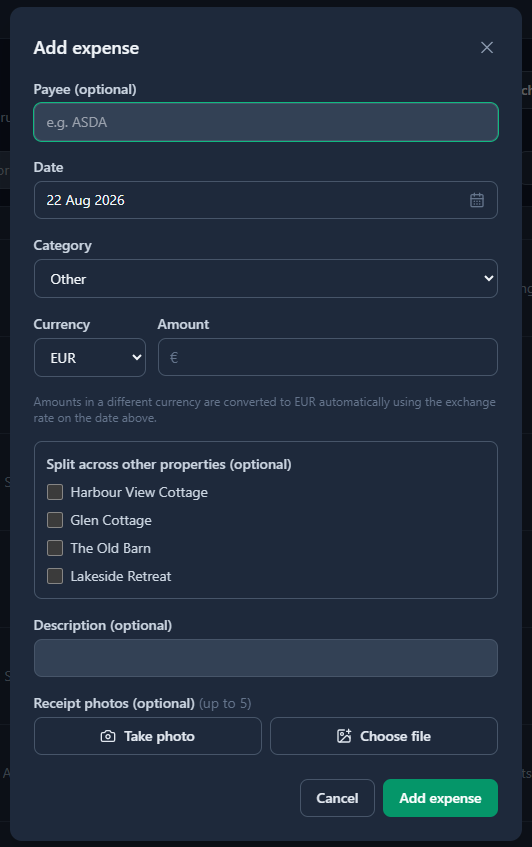
A number in a spreadsheet ("€142.50, maintenance") is fine until you're asked what it actually was. A photo of the receipt attached directly to that expense answers the question permanently, and it's the difference between a five-minute tax season and a stressful one spent emailing suppliers for duplicate invoices.
This matters more than it sounds: an accountant (or a tax authority, if it ever comes to that) trusts a category with a receipt behind it far more than a category that's just a claim.
Categorise consistently, not creatively
Pick a fixed, boring set of categories up front and stick to them: Cleaning, Maintenance/Repairs, Utilities, Insurance, Management/Agency Fees, Supplies is a solid starting set for most short-term rentals. The temptation is to invent a new, more specific category every time something slightly different comes up. Resist it. A consistent category list is what makes "how much did I spend on maintenance this year" an instant answer instead of a manual re-read of every line.
Track per property from day one
If you manage more than one property, keeping expenses separated by property from the very first entry saves a genuinely painful retroactive split later. It's the difference between "Seaview Cottage made €14,310 net this year" (a real, useful number) and "the portfolio made some amount, spread across two properties, in proportions I'd have to reconstruct."
Even with a single property today, tagging by property costs nothing and means you're not stuck redoing a year of records if you add a second one next season.
How this works in Hosts Assist: log an expense from your phone, snap a photo of the receipt right there, and it's categorised and attached to the right property immediately. Income vs. expenses, occupancy, and average nightly rate are already worked out on the dashboard, no formulas required.
Reconcile payouts as they land, not in bulk later
Expenses are only half the picture. The other half is making sure every payout from Airbnb or Booking.com is actually matched to the booking it's paying for. Left unchecked, it's easy to end up with payouts that don't obviously map to bookings, and no quick way to spot one that never arrived at all.
Matching a payout takes seconds the day it lands. Reconstructing three months of them takes an evening — and a missing one is much harder to spot by then.
Lock a year once it's done
Once a tax year is filed, the numbers behind it should stop moving. A live spreadsheet has no real way to enforce that: a dragged cell or an "oops, wrong tab" edit can quietly change a number that's already been submitted somewhere. Locking a completed year, so it can't be edited by accident, is a small feature that prevents a genuinely stressful problem.
The five-minute test
A good way to check if your system is actually working: at any random point in the year, can you say, within five minutes, exactly what a specific property has made and spent so far? If the honest answer involves opening three different apps, a phone photos folder, and a bank statement, the system is costing you more time than it's saving. If it's one dashboard, it's working.